Tech is cheap, curiosity is free, and side quests are how I scratch the itch without derailing the main storyline. These are random explorations — little adventures where I poke at something interesting, learn just enough to be dangerous, and move on. No deadlines, no deliverables, just play.
The rule: don’t overdo it. Side quests are seasoning, not the meal. If I’ve got more than 3 active at once, something needs to ship or get shelved. The whole point is that they’re lightweight — the moment they feel like obligations, they’ve failed.
Active Quests
No active quests right now. Exploring what’s next.
Completed / Graduated
Magic Monitor Card Detection
| Started: 2026-03-08 | GitHub | Live Demo | PR #60 |
Real-time playing card detection in the browser using YOLO + ONNX Runtime Web. Hold up a card to your webcam and it identifies all 52 cards with bounding boxes. Part of Magic Monitor, my smart mirror app.
The journey from “nothing works” to “98% precision”:
Training a YOLO model was the easy part. Getting it to actually work in the browser was a debugging adventure — the JS integration had the wrong output format, wrong class mapping, stretched preprocessing, and broken overlay coordinates. Each fix required understanding the full pipeline from camera frame to rendered bounding box.
| Model | Recall | Precision | Speed (CPU) | Size |
|---|---|---|---|---|
| YOLO26n @ 416 (first attempt) | 40% | 95% | 25ms / 40 FPS | 9.3 MB |
| YOLO26s @ 640 (current) | 73% | 98% | 108ms / 9 FPS | 36.5 MB |
Recall = how many cards it finds. Precision = how often it’s right about what it found.
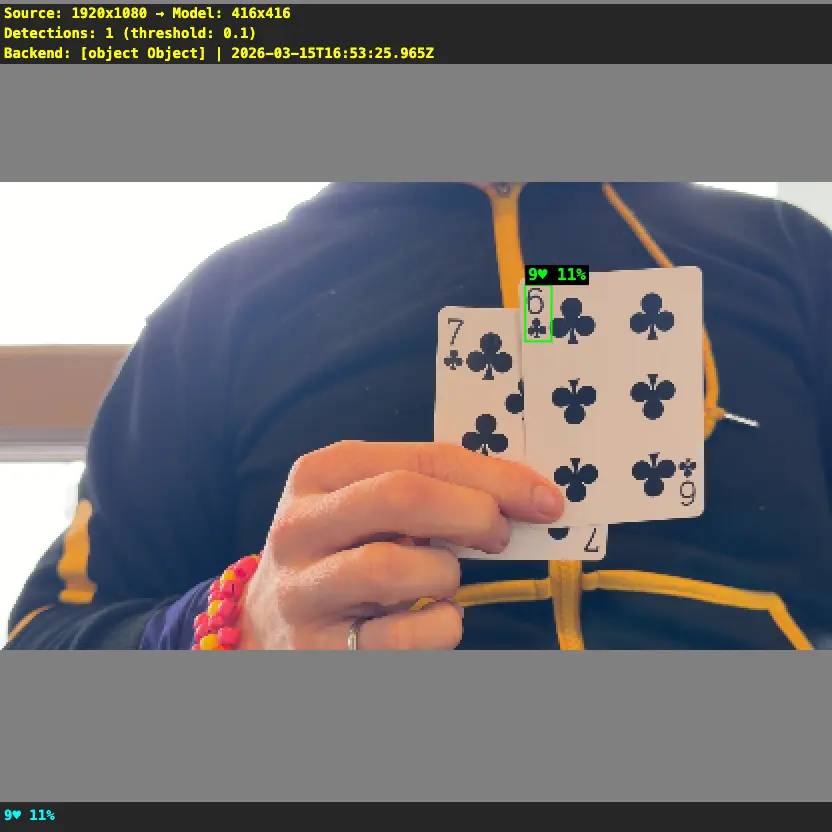
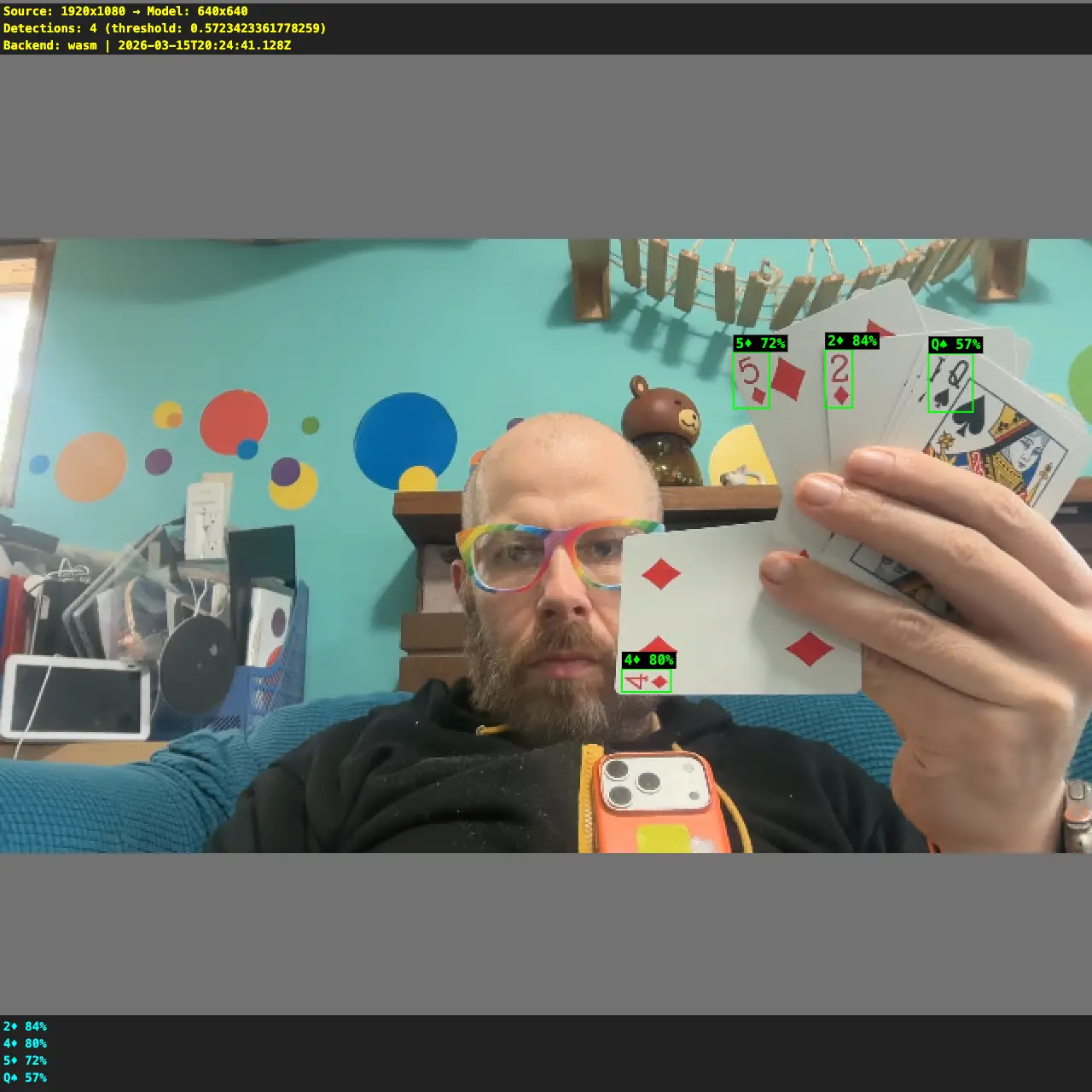
| Before (YOLO26n @ 416) | After (YOLO26s @ 640) |
|---|---|
| One wrong detection at 11% confidence. The model couldn’t see anything useful. | Four correct detections at 57-84% confidence. Boxes land right on the card corners. |
 |
 |
Key learnings:
- Preprocessing matters as much as the model. Stretching vs letterboxing, bilinear vs nearest-neighbor resize — these choices can double or halve recall without changing a single model weight.
- YOLO models are fully convolutional — no fixed input size. Train at 640x640, infer at 640x640, but the same weights work at any resolution. (Good explainer)
- Debug snapshots are essential. Added a
zkeypress that downloads a PNG showing exactly what the model sees with detection boxes burned in. Without this, I’d still be guessing why detections were wrong. - Browser ONNX Runtime needs WASM files from a CDN — can’t bundle them in Vite’s public/ directory due to dynamic import restrictions.
Training was shockingly easy: Open a Google Colab notebook, select an A100 GPU (~$1.30/hr in compute units), crank the batch size from 16 to 128 (the A100 has 80GB of VRAM so why not), and hit run. 50 epochs on 21K synthetic images finished in under 30 minutes for less than a dollar. The hardest part was remembering my Roboflow API key. Colab notebook.
Status: Merged to main. Detection works live in the browser. Next up: integrate with session recording and replay timeline.
Context Grabber
| Started: 2026-03-14 | GitHub |
My AI life coach would be way more helpful if it had access to context that’s currently trapped in my iPhone — health data (steps, sleep, heart rate), location history, screen time, etc. None of this is easily exportable in a format an LLM can use. Why not build a custom iOS app that extracts this data and makes it available?
The idea:
- A lightweight iOS app that pulls from HealthKit, CoreLocation, and other on-device APIs
- Exports structured data (JSON) that can be fed into life coaching conversations
- Background location tracking with SQLite storage for “where was I” context
- At-a-glance dashboard with summary banner and metric cards
Status: Graduated to side project. Core app built — health metrics (steps, heart rate, sleep with bedtime/wake, weight, meditation), background location tracking, dashboard UI, OTA updates, 68 tests. PR #1.
Shelved Quests
Apple Virtualization
2026-03-14
Running macOS VMs natively on Apple Silicon using Lume — a lightweight CLI for Apple’s Virtualization framework. Two use cases I wanted to explore:
- WebGPU testing — can GPU workloads run inside a VM?
- Claude over iMessage — give a Claude agent its own Apple Account and iMessage, so it can text people. Needs an Apple Account created and signed in inside the VM.
Setup — painlessly easy:
- Install Lume, then one command:
lume create vm-1 --ipsw latest --disk-size 50 --unattended tahoe - Unattended setup automates the entire macOS Setup Assistant via VNC + OCR — zero manual clicks
- SSH (
lume ssh vm-1) and VNC (lume run vm-1) just work out of the box
Findings:
- WebGL works, but WebGPU does not — tested with thetest.com/tests/gpu. Apple’s Virtualization framework provides basic GPU rendering but doesn’t expose WebGPU.
- Can’t create Apple Accounts from within the VM
- Claude computer-use can’t create Apple Accounts either — it hard refuses
Why shelved: Both use cases hit dead ends. WebGPU isn’t exposed in Apple VMs, and Apple Account creation can’t be automated. Revisit if Apple adds GPU passthrough or account creation becomes scriptable.