Agents are slow. Not slow like “wait a second,” slow like “go make coffee and come back.” So you run several in parallel. But now you’ve got a different problem: you’re an air traffic controller with no radar. You need a cockpit - a physical and software control surface that gives you visibility into what your agents are doing and lets you switch between them instantly.
AI-augmented, roughly 85% AI (what this means)
I love AI, and I use it on posts like this one partly to get better at using it. The percent is a rough guess: after rounds of prompting, rewriting and editing, it's very hard to say which words came from whom.
- Why You Need a Cockpit
- The Cockpit Today
- How the Pieces Fit Together
- What I’m Still Building
- The Meta-Question
Why You Need a Cockpit
Here’s the thing about CHOP today: a single agent session is straightforward. You talk, it codes, you review. No cockpit needed. But the moment you run two agents in parallel, everything changes.
With parallel agents you need to:
- See what each agent is doing without SSH-ing around
- Switch between agents instantly - context-switching friction kills your flow
- Talk to whichever agent needs you without typing commands to navigate there first
- Know when something needs attention without constantly checking
- Know what you can afford to spend - several subscriptions means managing tokens across them
This is the gap between Stage 5 (single agent) and Stage 7 (specialized tools) in the AI coding evolution. The agents themselves are fine. It’s the human interface that’s the bottleneck.
A cockpit solves this. Not with one tool, but with a stack of tools that each handle a different layer of the problem.
The Cockpit Today
Voice Input - The Primary Interface
I talk to my agents. It sounds ridiculous until you try it - then you can’t go back. Talking to Claude is just like talking to another engineer - and that’s the real insight. It’s not about voice-as-input-method. It’s that talking changes how you think. You do more stream of consciousness back and forth. You say things you’d never bother typing. Half-formed thoughts, rough directions, “actually wait, no, try this instead” - the kind of thing you’d say to a colleague at a whiteboard.
Why voice for the cockpit specifically? Two reasons. First, hands-free: I can look at the dashboard, glance at a Stream Deck button, switch tmux panes - all while giving instructions. Voice doesn’t compete with the other interfaces. Second, mobility: voice works from a phone, from the couch, from a treadmill. When agents are slow and you’re waiting anyway, you don’t need to be at a keyboard.
At home I use Wispr Flow for its speed and filler-word cleanup. At work, SuperWhisper runs local models on M4 Max chips - no cloud, no privacy concerns.
The funny part: transcription quality barely matters. Agents are resilient to garbled input. I mumble half-formed thoughts and Claude figures out what I meant. Even the input can be sloppy when the receiver is smart enough.
See more in my AI Journal entry on voice coding.
The mic matters more than I thought
Software gets the headlines, but a real lapel mic close to your mouth beats laptop and phone built-ins by a country mile. I used to think Siri dictation was terrible, but it turned out part of the problem was my input. The right microphone totally fixes it — Siri’s now almost as good as Wispr Flow.
What I’m using:

The Hollyland Lark M2S Mini Combo — wireless lavalier, 7g, USB-C plus a Camera RX, works with iPhone, Android, laptop, or camera, 300m range. I didn’t actually buy it for this — I had it for another project, and it turned out to be the right tool for vibing too. So this isn’t a “go spend a few hundred bucks” rec; it’s a “if you already have a good lav, point it at Wispr or Siri” rec.
For the full deep dive on why voice changes how you work with AI, see You Need to Use Voice.
More mic options as I try them.
And a button for the voice: a $36 ZTYTO scrolling ring, a touchpad ring sold for scrolling TikTok. I remapped it in Karabiner so a tap toggles Wispr Flow and the right button hits Enter. Now I can dictate and send a prompt from the couch or the treadmill without touching the keyboard.
Tmux on Super Steroids - The Multiplexer
Tmux is the backbone. Every agent runs in a tmux session inside a Docker container. The problem is: stock tmux navigation is painful when you have 8+ sessions across multiple containers.
So I built a hand-written Rust picker that’s hyper-optimized for this exact use case:
- Token-based fuzzy matching - type “cl set” and it finds panes with both terms
- Visual markers -
◀for current pane,◁for previous (Tab toggles between them) - Auto-layout switching - horizontal/vertical based on terminal size
- Window auto-rename - every 10 seconds, windows rename based on running process (“claude” becomes “cl”)
- 14ms response time - ported from Python (100ms) to Rust. I don’t even know Rust, but AI made it trivial
Why it matters for the cockpit: This is the “stick” that steers. One keystroke opens the picker. Another keystroke lands you in the right agent session. No thinking, no typing paths, no remembering which container is which.
pick-links — pulling URLs out of scrollback. rmux_helper pick-links scans the current pane’s scrollback and surfaces every PR URL, running server address, and IP as a TUI picker.
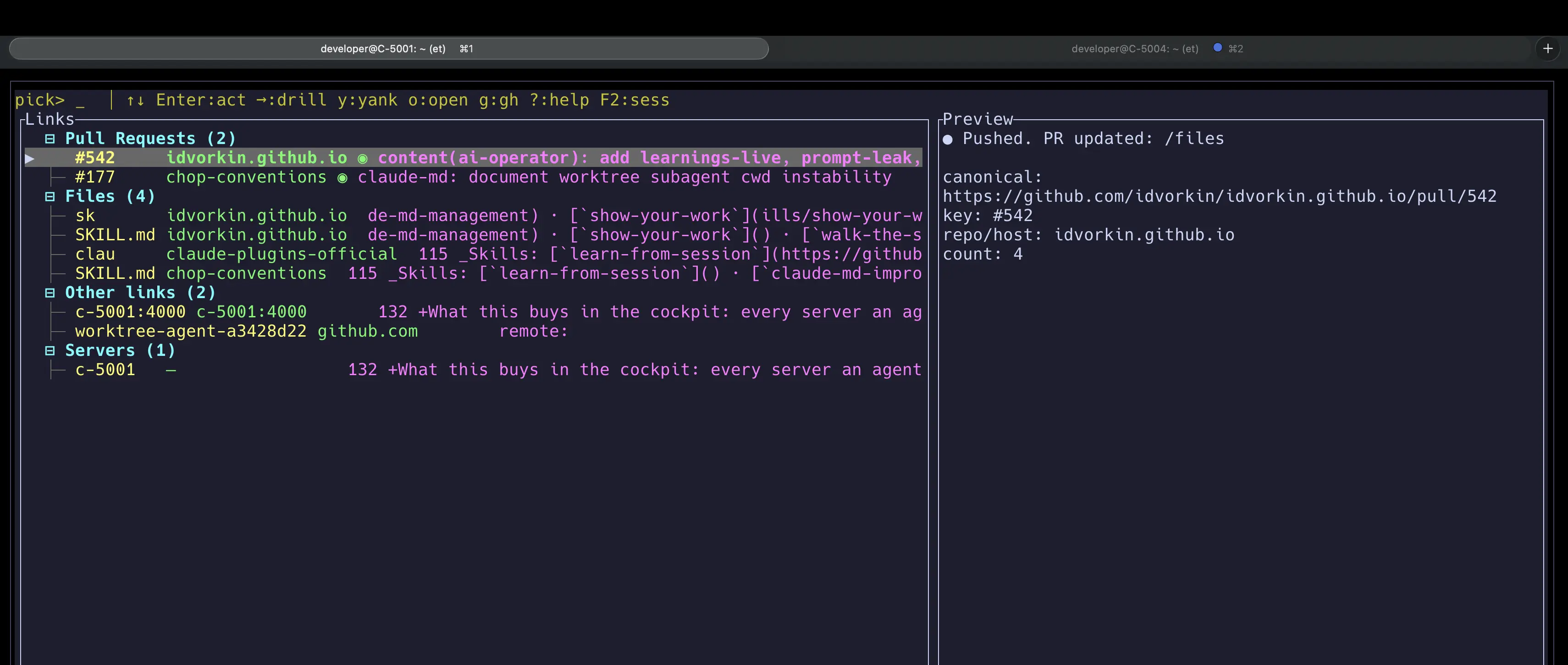
Pick an item and the URL lands on the Mac’s clipboard. An Alfred hotkey — wired through y.py, my yabai helper, to bring the browser window forward — reads the clipboard and opens the page. One pick in the picker, one hotkey on the Mac, and I’m on the URL. (Eventually this moves onto the Agent Dashboard as a clickable row; then even the hotkey goes away.)
Full story: Rust tmux_helper - 10x speedup from Python
Alfred - The Session Switcher
Alfred is the layer above tmux. Where tmux handles sessions within a terminal, Alfred handles the broader context: which application, which workspace, which container environment.
I use Alfred for:
- Quick blog search (
idvkeyword) - find any post without leaving what I’m doing - Screenshot capture and management (
sskeyword) - Window navigation - jump between terminal windows, browsers, dashboards
- Clipboard history - copy from one agent’s output, paste into another’s context
The integration I want to build next: an Alfred workflow that shows all running agent sessions with their current status, lets me pick one, and drops me directly into that tmux pane. Right now I do this manually through tmux. Alfred could make it one hotkey from anywhere on the system.
Agent Dashboard - The Radar Screen
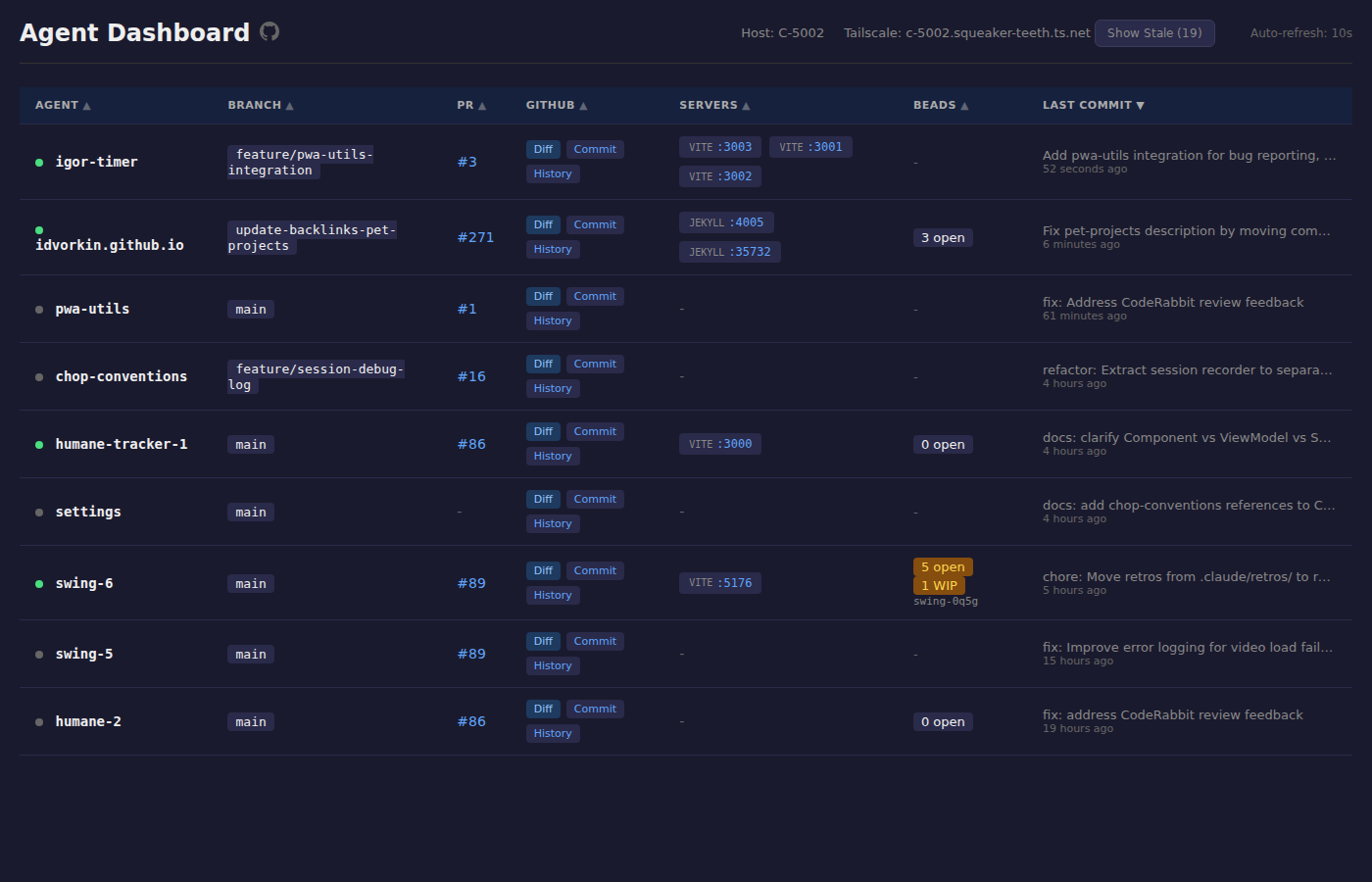
The Agent Dashboard is the piece that gives you the bird’s-eye view:
- Auto-discovers running agents across containers
- Shows git status - which branch, how many commits ahead, any conflicts
- Shows PR status - open, review requested, merged
- Shows server status - Jekyll instances, ports, health
I didn’t build this. I gave the requirements and Claude built it itself. The irony of AI building its own monitoring tool isn’t lost on me.
Why it matters for the cockpit: Without this, you’re blind. You don’t know which agent finished, which one is stuck, which PR needs review. With it, one glance tells you where to focus attention.
There’s now a phone-sized companion to this, built by Larry: the Cockpit folds open PRs, unfinished issues, running agents and the decisions waiting on me into one page I can read from anywhere on Tailscale.
GitHub Views - The Triage Queue
The Agent Dashboard knows what my agents are doing right now. GitHub knows what they’ve already filed. Different instruments, same cockpit. I keep two saved searches pinned in the browser — everything idvorkin-ai-tools touched in the last four weeks, sorted by recent activity:
One tab, one glance, full triage queue. Before I had these, agent PRs on stale branches just vanished from my attention; now the staleness is the sort key. For the long view, how much of that queue actually merges month over month, I check Build Stats.
Stream Deck - The Physical Buttons
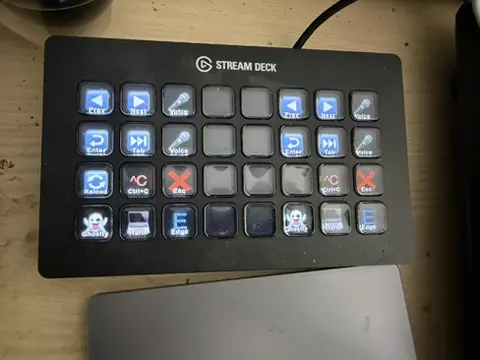
The Stream Deck plugin gives me physical buttons for:
- Tmux navigation - previous/next pane without touching the keyboard
- Voice activation - toggle Wispr Flow on/off
- Utility keys - common actions I’d otherwise have to type
Physical buttons matter because they don’t require visual attention. I can hit “next agent” by feel while reading code on screen. It’s the same reason cars have physical knobs for volume instead of touchscreen sliders - you don’t want to look away from the road.
Built the plugin in 30 minutes with AI. See the journal entry.
Tailscale - The Network
Every agent runs on a Linux dev VM in my closet. Tailscale puts that VM on a private network that follows me across devices — same hostname, same URLs, from the couch or the treadmill or a coffee shop.
What this buys in the cockpit: every server an agent launches is reachable from wherever I am. Agent runs jekyll serve on the dev VM, the preview is at http://c-5001:4000 from my phone browser. The link picker catches server URLs out of the agent’s stdout; one tap and the rendered page is on whatever device I have out. No port-forwarding. No ngrok tunnel. No SSH gymnastics.
Without Tailscale, every agent-launched server is a negotiation. With it, servers are just URLs.
How the Pieces Fit Together
Here’s a typical multi-agent scenario and how the cockpit helps:
Setup: Three agents running - one on a blog feature, one fixing tests, one updating docs. Each in its own tmux session inside a Docker container.
- Agent Dashboard (browser tab) shows me all three agents, their git branches, and PR status. I see the test-fixer just opened a PR.
- I hit a Stream Deck button to jump to that agent’s tmux pane.
- Tmux picker (14ms) lands me in the right session instantly.
- I review the PR, voice my feedback: “The test for the edge case with empty arrays is missing, add that.”
- While that agent works, I glance at the dashboard - the docs agent needs a merge. Hit another Stream Deck button.
- Repeat.
The cockpit turns multi-agent orchestration from “constantly lost and confused” into “air traffic control with good radar.” It’s not perfect yet, but it’s the difference between Stage 5 and Stage 7. In orchestrator terms, the cockpit is the overview brick.
The cockpit is my side of the glass. The agents have instruments of their own — Browsers for Machines covers the ones they use to reach the web.
What I’m Still Building
The cockpit is a work in progress. Here’s what’s on the list:
- Alfred integration for agent sessions - one hotkey from anywhere to pick and jump to an agent. Show status inline in the Alfred picker.
- Dashboard notifications - push alerts when an agent finishes or gets stuck, instead of me polling
- Voice routing - tell the system which agent to talk to, not just talk into whichever terminal is focused. “Hey agent-2, run the tests.”
- Better merge coordination - when two agents touch related files, detect the conflict before it happens
- Session recording - capture what each agent did in a session for later review. Some of this exists in published CHOP logs, but it’s manual.
The Meta-Question
Is all this cockpit infrastructure a waste? Every month, models get smarter. Maybe in six months, a single agent can handle what three do today, and I won’t need parallel orchestration at all.
Maybe. But the meta-skill here isn’t “how to configure tmux” - it’s how to build a human interface for AI delegation. That problem isn’t going away. The specific tools will change (tmux might become something else, Alfred might not exist), but the pattern of needing visibility, fast switching, and ambient awareness when orchestrating autonomous systems? That’s permanent.
Same thing I said about CHOP tools in general: learn the transferable skills, hold the specific tools loosely.
There’s also a psychological side to flying this thing — the flow, the dopamine, the hours that vanish. That’s The Psychology of Vibing.